When it comes to PC gaming, 4K resolution is the future, offering stunning visuals that elevate your gaming experience. Thanks to innovative technologies like Nvidia DLSS and AMD Fluid Motion Frames, you no longer need a top-tier PC to enjoy 4K gaming. Monitors such as the Asus ROG Swift PG32UCDM, my top pick, showcase incredibly detailed images, vibrant colors, and high frame rates, all while maintaining excellent responsiveness. If the cost or PC requirements seem daunting, don't worry—there are plenty of great 4K gaming monitors available at various price points.
TL;DR – These Are the Best 4K Gaming Monitors:
 Our top pick### Asus ROG Swift PG32UCDP
4See it at AmazonSee it at Best Buy ### Arzopa 32" 4K 144Hz Gaming Monitor
2See it at Amazon ### GigabyteM27U
0See it at Amazon ### LG Ultragear GX9
1See it at Amazon ### Alienware AW3225QF
3See it at DellA 4K gaming monitor is the ultimate way to experience your favorite PC games, providing incredible sharpness with four times the resolution of a 1080p gaming monitor. As more graphics cards become capable of handling this high resolution, 4K gaming is more accessible than ever. These monitors also serve as excellent choices for PS5 gaming. After testing and researching dozens of options, we've compiled a list of the top five 4K gaming monitors to help you make an informed decision.
Additional contributions by Danielle Abraham and Matthew S. Smith.
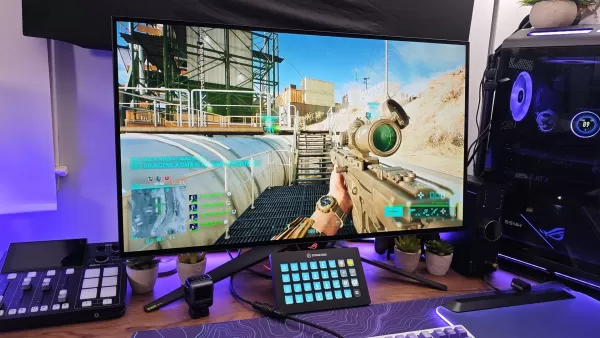 1. Asus ROG Swift PG32UCDP
Best 4K Gaming Monitor
Our top pick### Asus ROG Swift PG32UCDP
4WOLED gaming monitor with 480Hz refresh rate and 4K@240HzSee it at AmazonSee it at Best BuyProduct SpecificationsScreen Size32"Aspect ratio16:9Resolution3840x2160 / 1920x1080Panel typeOLED HDR compatibilityDisplayHDR 400 True Black Brightness1,300 cd/m2Refresh rate240Hz / 480HzResponse time0.03ms Inputs2 x HDMI 2.1, 1 x DisplayPort 1.4, 1 x USB-C (DisplayPort mode), 3 x USB-A, 1 x USB-BPROSBeautiful OLED displayFast refresh rate with great motion clarityUp to 480Hz refresh ratePlentiful gaming featuresCONSMay be too large for some gaming spacesIf you're seeking the pinnacle of gaming monitors and are willing to invest in it, the Asus ROG Swift PG32UCDP is your best bet. At 32 inches, it offers the perfect canvas to appreciate its crisp 4K resolution. Its WOLED panel, which stands for white OLED, delivers exceptional brightness and vibrant, factory-calibrated colors, making it ideal for both gaming and creative work. Thanks to its dedicated white LED, it's more energy-efficient and should last longer than competing QD-OLED monitors.
In my review of this Asus ROG Swift monitor, its versatility truly stood out. You can game at 4K with stunning detail at up to 240Hz, or switch to a 480Hz mode for unparalleled clarity and responsiveness, albeit at a reduced 1080p resolution. This mode enables more graphics cards to achieve higher frame rates. Additionally, it features Extreme Low Motion Blur (ELMB) to further enhance motion clarity, making it noticeable even to casual gamers. As a longtime Battlefield player, I found the difference immediately apparent without needing to scrutinize every pixel.
The monitor also boasts a comprehensive suite of gaming features, including the controversial Sniper Mode, which provides both a reticle and a zoomed-in window on your screen. Whether you choose to use it or not is up to you, but the Asus ROG Swift PG32UCDP is undoubtedly the leading 4K gaming monitor on the market today.
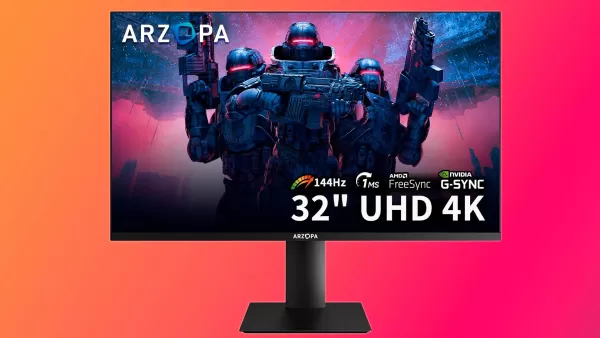 2. Arzopa M3RC - 32" 4K 144Hz Gaming Monitor
Best Budget 4K Gaming Monitor
### Arzopa 32" 4K 144Hz Gaming Monitor
2This display marks Arzopa's impressive entry into the gaming monitor market, offering excellent value. See it at AmazonProduct SpecificationsScreen size32” Aspect ratio16:9Resolution3840x2160Panel typeAMD FreeSync, G-Sync compatible Brightness350 cd/m2Refresh rate144HzResponse time1ms Inputs2x HDMI 2.1, 1x DisplayPort 1.4, 1x USB Type-C, 2x USB 2.0, 1x audio outPROS144Hz refresh rateIPS panel with good color calibrationBuilt in USB hubGreat valueCONSLow peak brightnessProduct support is questionableGone are the days when 4K high refresh rate monitors were prohibitively expensive. With the Arzopa M3RC priced around $300, 4K gaming is now accessible to a broader audience. Arzopa, known for its quality portable monitors, has successfully applied its principles of balancing features with affordability to its full-size gaming monitor.
This monitor delivers a native 4K resolution at a 144Hz refresh rate, ensuring crisp visuals and smooth gameplay, further enhanced by AMD FreeSync and Nvidia G-Sync compatibility. The color-rich IPS panel offers surprisingly accurate colors right out of the box, a rarity among budget monitors.
While some compromises are expected at this price point, the Arzopa M3RC exceeds typical expectations. It includes a USB Type-C video input and a two-port USB hub, features often omitted in budget models. The trade-off is primarily in brightness, rated at 350 nits, which is moderate. More concerning is the potential for limited product support from a smaller brand, though it comes with a 1-year limited warranty. Despite these considerations, the monitor has garnered positive feedback from early adopters, making it a compelling choice at its price.
Gigabyte M27U
Best 4K Gaming Monitor Under $500
### GigabyteM27U
0Fast, bright, and affordable, this monitor sets the standard in its price range. With a peak brightness of around 700 nits, it delivers one of the best HDR gaming experiences available under $500.See it at AmazonProduct SpecificationsScreen Size27"Aspect ratio16:9Resolution3840x2160 Panel typeSuperSpeed IPSHDR compatibilityDisplayHDR 400 True Black Brightness400 cd/m2 (~700 cd/m2 peak)Refresh rate160HzResponse time1msInputs2x HDMI 2.1, 1x DisplayPort 1.4, 1x USB Type-C, 3x USB 3.2 Downstream ports, 1x USB 3.2 Upstream port, 1x Earphone JackPROSHigh peak brightnessPlentiful connectivity optionsReliably smooth, reliably great looking gaming experienceCONSNo local dimmingThe Gigabyte M27U stretches the definition of "budget" but remains a standout in its price range. It offers superior picture quality and an impressive HDR experience, thanks to its high peak brightness and edge-lit local dimming.
For those seeking the best in 4K gaming, the Gigabyte M27U delivers. In SDR mode, it reaches up to 400 nits, but with HDR enabled, it can hit nearly 700 nits, enhancing highlights and color vibrancy. The monitor also features local dimming zones that boost contrast beyond typical IPS panels.
It's packed with gaming features, including an on-screen reticle, Shadow Boost, and more. The Gigabyte OSD Sidekick software simplifies access to these features and picture settings. It's also an excellent choice for multi-system setups, thanks to its built-in KVM, allowing seamless input switching with your mouse and keyboard.
The only downside is choosing between local dimming and peak brightness, as enabling local dimming reduces overall screen brightness. However, the trade-off is worthwhile, ensuring a top-notch gaming experience regardless of your choice.
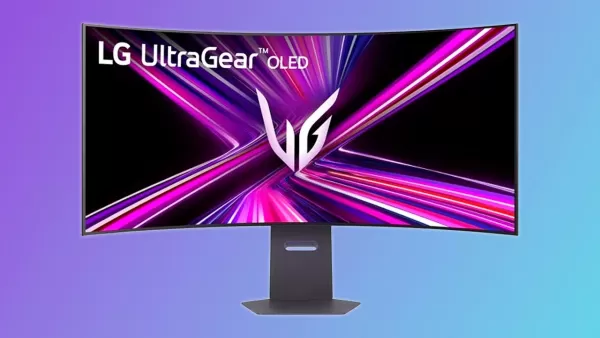 4. LG UltraGear GX9 (45GX950A-B)
Best Ultrawide 4K Gaming Monitor
### LG Ultragear GX9
1Large and in-charge, this is a true 4K ultrawide with features to spare.See it at AmazonProduct SpecificationsScreen size44.5"Resolution5120x2160Panel typeOLED, G-Sync Compatible, AMD FreeSync Premium ProBrightness1,300 cd/m2 Refresh rate165Hz/330HzResponse time0.03msInputs2x HDMI 2.1, 1x DisplayPort 2.1, 2 x USB 2.0, 1 x USB Type-CPROSDual resolution and refresh rate optionsHigh peak brightness with per-pixel local dimming (OLED)DisplayPort 2.1 supportCONSRequires a powerful GPUDeep curvature isn't for everyoneIf you crave an ultrawide gaming monitor with the highest resolution available, the LG UltraGear GX9 is your answer. Its massive 45-inch display with an 800R curvature offers an immersive experience, drawing you into the game with its 5120x2160 resolution and 165Hz refresh rate.
For competitive esports players, the monitor offers an FHD mode that increases the refresh rate to 330Hz, providing top-tier responsiveness and motion clarity. The OLED panel technology allows for per-pixel brightness control, delivering infinite contrast and vivid colors, enhancing your gaming and entertainment experience.
However, this high-performance monitor requires a powerful GPU to run games at its full potential, given its resolution exceeds native 4K. Its deep curvature may also not suit everyone, potentially causing distractions outside of gaming. Despite these considerations, the LG UltraGear GX9 is an outstanding choice for those seeking a premium 4K ultrawide gaming monitor.
Dell Alienware AW3225QF
Best Curved 4K Monitor
### Alienware AW3225QF
3A large 32” curved display with looks and specs to match its size. 4k UHD, super-powered 0.3ms response times, and 240hz; this is what a premium gaming monitor looks like. See it at DellProduct SpecificationsScreen size32"Aspect ratio16:9Resolution3840x2160Panel typeQD-OLED, Adaptive-Sync, G-Sync CompatibleHDR compatibilityDisplayHDR 400, HDR10, Dolby VisionBrightness250 cd/m2 (1,000 cd/m2 peak)Refresh rate240Hz Response time0.3msInputs2 x HDMI 2.1, 1 x DisplayPort 1.4 PROSReliably excellent gaming experienceFantastic HDR240Hz refresh rate for competitive gamingCONSExpensiveFlat panels may be in vogue, but the Alienware AW3225QF is the top choice for gamers who prefer a curved display. Its 32-inch size and 240Hz refresh rate offer an immersive and smooth gaming experience. The quantum dot panel delivers rich and accurate colors, while its gentle curve enhances immersion without distorting text.
This monitor's 240Hz refresh rate and 0.3ms response time make it ideal for competitive gaming, with no ghosting in tests or real-world gameplay. Its wide VRR support ensures a smooth and tear-free experience across a broad range of frame rates.
The AW3225QF stands out with its HDR performance, reaching up to 1,000 nits in HDR mode, and supports Dolby Vision and eARC for enhanced streaming and audio experiences. Whether you're a PC or console gamer, the Alienware AW3225QF offers a premium curved 4K gaming experience.
What to Look for in a 4K Gaming Monitor
When shopping for a 4K gaming monitor, consider the features and image quality you desire within your budget. Over the past few years, 4K gaming monitors have become more accessible, with high refresh rates available even in models under $400. These monitors often support Nvidia G-Sync and HDR, enhancing your gaming experience.
Size: For most users, a screen size of 27 to 32 inches is ideal for 4K resolution. While smaller sizes can offer higher pixel densities, the benefits of 4K become less noticeable below 27 inches. Larger screens up to 48 inches are available for those seeking a "big screen" experience, though image softness may increase with size.
Panel: The type of panel significantly affects your gaming experience. IPS panels are known for accurate colors and wide viewing angles but have lower contrast. VA panels offer better contrast but may exhibit ghosting. OLED panels provide infinite contrast and fast response times, though they carry a risk of burn-in. Mini-LED backlights, often referred to as Mini-LED monitors, offer improved contrast and brightness but may exhibit blooming, which can be minimized with more zones.
Refresh rate: A minimum of 120Hz is recommended for gaming, with 144Hz or higher preferred. Higher refresh rates reduce input latency and motion blur, crucial for competitive gaming. For esports, 240Hz or higher monitors are advantageous.
Connectivity and supporting features: For console gaming, ensure the monitor supports HDMI 2.1 for full 4K 144Hz resolution. Consider additional features like Dolby Vision, Nvidia G-Sync, AMD FreeSync, built-in KVMs, USB hubs, and gaming-specific features when making your choice.
4K Gaming Monitor FAQ
Are 4K gaming monitors worth it?
4K gaming monitors offer stunning visuals but may not be suitable for everyone. If your PC has an entry-level graphics card, running games at 4K could result in low frame rates. However, with a mid-range GPU from the current generation or a high-end GPU from the previous generation, you can benefit from 4K gaming. Advanced upscaling technologies like Nvidia DLSS and AMD Fluid Motion Frames make it easier to achieve high frame rates without needing the most powerful hardware.
Is 1440p better than 4K?
1440p can be preferable if you prioritize higher frame rates over visual sharpness. It's less demanding on your system, allowing for higher settings and frame rates. However, with technologies like Nvidia DLSS and AMD Fluid Motion Frames, 4K gaming is more achievable, even on midrange systems. Consider what you value most in your gaming experience when deciding between the two resolutions.
Do you need an expensive graphics card to run a 4K gaming monitor?
Not necessarily. Thanks to advanced upscaling features like Nvidia DLSS and AMD Fluid Motion Frames, you can enjoy 4K gaming with a midrange GPU like the AMD Radeon 7700 XT or Nvidia RTX 4070. While a top-tier GPU is still required for native 4K gaming on ultra settings, these technologies make 4K gaming accessible to a wider range of hardware.
 Latest Downloads
 Downlaod




 Top News